




After cycling through multiple Thunderbolt docks with frustrating results, the Kensington SD2600T feels like a breath of fresh air. Here’s why it’s become my daily driver:
The Good Stuff:
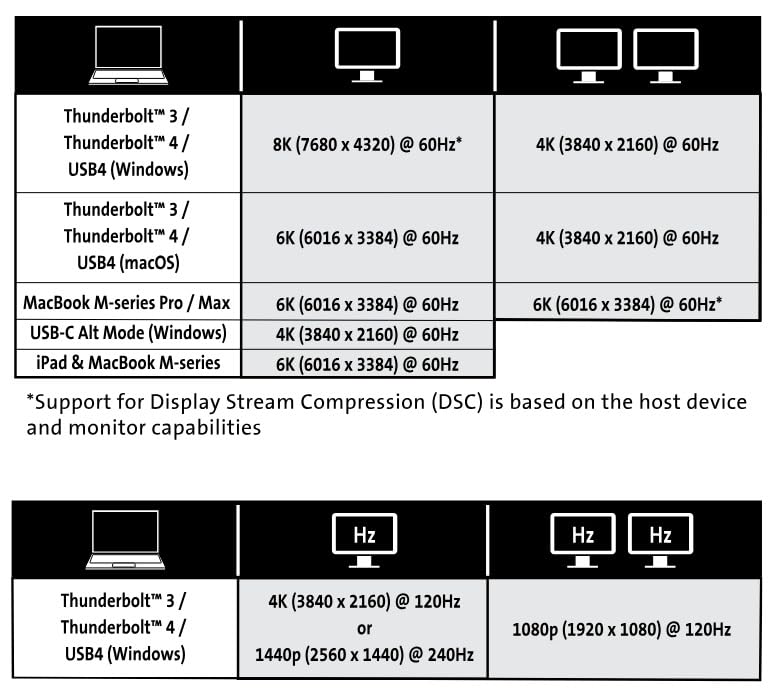
✅ Dual monitor magic: Driving my 1080p + 2K monitors simultaneously (via HDMI) was plug-and-play perfect—even after sleep/wake cycles on Windows. Mac users with Pro/Max chips get dual 4K!
✅ Speed demon: Connected my OWC Thunderbolt 3 SSD enclosure and hit those sweet 40Gbps speeds without breaking a sweat. USB-A port handled a 10Gbps SATA SSD dock flawlessly.
✅ Sleek & compact: Love the understated metal body—it’s smaller than most docks yet feels premium. The power brick? Surprisingly manageable compared to others.
✅ 65W charging FTW: While testing with my MacBook Pro, it delivered consistent power without stealing juice from downstream ports (looking at you, Accell).
Reality Checks:
⚠️ M1/M2/M3 limitations: Base Apple Silicon models only support one external display—a chipset restriction, not the dock’s fault. My colleague’s M3 Air confirmed this.
⚠️ The power button puzzle: Honestly, why include one? It only toggles the dock itself—not connected devices.
Pro Tip:
The included manual PDF (often overlooked!) clarifies resolution support better than any product page. Bookmark it if you’re mixing monitor setups.
Final Verdict:
For under $60, this punches way above its weight. It’s not perfect (where’s that Kensington lock slot?), but as someone who’s burned by flaky docks before, I’m cautiously optimistic this might finally be ‘The One.’ Just temper expectations if you’re rocking base-model Apple Silicon.
 Report
 Share to...


